Adobe’s PDF standard is handy whenever you need to distribute some information and be sure that it’s seen the same way by all recipients. But PDF files are also infamously tough to edit.
Unless you’ve paid for Adobe Acrobat (the full version, not just the Reader), you’ll have to look for a specific tool to edit the text of PDFs. Many of these are available on various platforms, but for an easy and free method that works across all kinds of desktops and mobile devices, you can use Google Docs.
If you have your PDF file ready, open drive.google.com in any browser and log in with your Google account. It’s possible to go through this process on mobile with a phone browser, so long as you do it in “desktop view,” but it’s going to be somewhat difficult—get to a full laptop or desktop PC if you can.
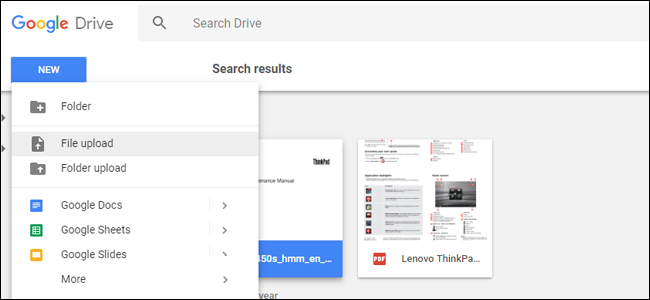
Upload your PDF file from your local files by clicking the blue “NEW” button on the left, then “File upload.” Select your PDF and wait for it to upload to Google’s server.

Once the file is in your drive, right-click or long-tap the item in Drive’s main view. Select “Open Open with,” then click “Google Docs.” The PDF document will open in a new browser tab in the Google Docs interface.
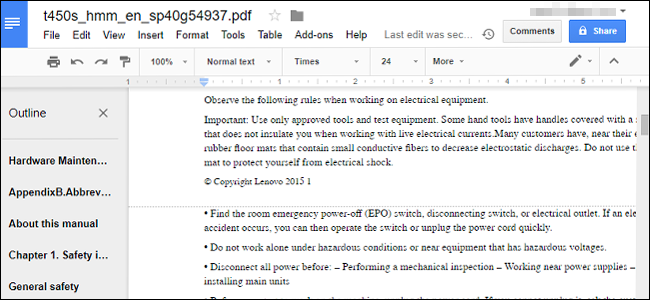
From here you can edit any of the text in the PDF document as if it were a standard word processor file. some of the formatting may be a bit off thanks to Docs’ interpretation of the images and spacing in the PDF file, but all of the formatted text should be visible and editable—if it’s a larger file, Docs will even create an automatic outline separated into pages.

You can edit any of the text in this window and save your work online in Google Docs for later. If you’d rather have a standard document file for an offline word processor, click “File,” then “Download as.” Here you can choose from Docx, ODT, TXT, RTF, and other formats, so you can open them in Microsoft Office (or your word processor of choice).
Click on the one you want, and it will immediately be downloaded to your default desktop or phone folder. That’s it! You now have a saved, editable copy of your original PDF, compatible with any word processor.
Need Information or Confused about Something ?
Ask a Question
Sponsored Guide
Complete Guide to NSFAS Online Loan Application for South African Students (2025)
If you are a South African student looking to pursue higher education but are facing financial difficulties, the National Student Financial Aid Scheme (NSFAS) is one of the most accessible funding options available. NSFAS provides financial aid in the form of bursaries and loans to qualifying students at public universities and TVET colleges in South Africa.
This guide will walk you through everything you need to know about the NSFAS loan application process, from eligibility requirements to application steps and frequently asked questions.
📌 What is NSFAS?
The National Student Financial Aid Scheme (NSFAS) is a government-funded financial aid scheme aimed at helping students from low- and middle-income households to access tertiary education without the burden of upfront fees.
NSFAS offers both bursaries and income-contingent loans:
- Bursaries: For eligible students who meet academic and household income criteria (especially for TVET and university students).
- Loans: For students who do not meet all bursary criteria or who are pursuing postgraduate qualifications not funded under bursary schemes.
✅ Who Qualifies for an NSFAS Loan?
To qualify for an NSFAS loan (especially for postgraduate students or programs not funded under the bursary system), you must:
- Be a South African citizen.
- Be financially needy, with a household income of less than R350,000 per year.
- Have a valid South African ID.
- Be enrolled or accepted to study at a public university or TVET college.
- Not be funded through another bursary program that covers all expenses.
- Maintain satisfactory academic progress (returning students).
📚 Courses Funded by NSFAS
NSFAS primarily funds undergraduate qualifications, but certain postgraduate programs (e.g., PGCE, postgraduate diplomas in education, and professional courses like LLB) may be considered under the NSFAS loan scheme, not bursaries.
If you’re studying:
- Undergraduate degree or diploma: You are likely eligible for a full NSFAS bursary.
- Postgraduate study: You may qualify for a loan, depending on the course and funding availability.
📄 Required Documents for NSFAS Application
When applying, make sure you have the following documents scanned and ready:
- Certified copy of your South African ID or Smart Card.
- Parent(s) or guardian(s) ID documents.
- Proof of income (latest payslips, UIF, or affidavit if unemployed).
- Consent Form signed by your parent(s)/guardian(s) to allow NSFAS to verify income.
- Proof of registration or acceptance at a public institution.
- Academic transcripts (for continuing or postgraduate students).
🖥️ How to Apply for an NSFAS Loan Online
Step-by-Step NSFAS Online Application Process (2025)
-
Visit the NSFAS Website
Go to: https://www.nsfas.org.za
-
Create an Account
- Click on “MyNSFAS” and register your profile.
- You’ll need a valid email address and South African cellphone number.
- Choose a strong password and verify your account via email or SMS.
-
Login and Start the Application
- After registration, log in to your MyNSFAS account.
- Click on “Apply” to begin a new application.
-
Fill in Your Personal Details
- Input your ID number, name, surname, and other details exactly as they appear on your ID.
- Provide household income information and living arrangements.
-
Upload Required Documents
- Upload all supporting documents in PDF or JPEG format.
- Each document must be clear and under the size limit specified.
-
Submit Your Application
- Review your application for accuracy.
- Click “Submit” and wait for a confirmation message.
-
Track Your Application
- Log in regularly to check your application status.
- You will be notified via SMS and email at each stage of the process.
🗓️ Important NSFAS Dates (2025)
- Application Opening Date: September 1, 2025
- Application Deadline: January 31, 2026
- Appeals Period: February 2026 (if rejected)
- Disbursement: After registration and approval
Note: Dates are subject to change; always confirm on the official NSFAS website.
💸 What Does the NSFAS Loan Cover?
NSFAS funding typically includes:
- Tuition fees
- Registration fees
- Accommodation (if living away from home)
- Meals and transport
- Learning materials (e.g., textbooks)
For loans, repayment is only required once you start working and earn above a threshold (around R30,000 annually, but subject to change).
🔄 NSFAS Loan Repayment
Repayments are:
- Income-contingent – you only repay when you can afford to.
- Administered by DHET (Department of Higher Education and Training).
- Interest-bearing, but interest rates are low and favorable.
You can also apply for a partial loan conversion to a bursary if you perform well academically.
🔁 How to Appeal a Rejected NSFAS Application
If your application is rejected, you may submit an appeal via your MyNSFAS portal:
- Log into your MyNSFAS account.
- Click on “Track Funding Progress”.
- If rejected, click on “Submit Appeal”.
- Upload any missing or corrected documents.
- Provide a clear explanation or motivation.
📱 NSFAS Contact Information
- Website: https://www.nsfas.org.za
- Email: info@nsfas.org.za
- Toll-Free Number: 08000 67327 (Monday–Friday, 8 AM–5 PM)
- Twitter: @myNSFAS
- Facebook: NSFAS
📝 Final Tips Before Applying
- Apply early to avoid system overload near the deadline.
- Use your own email and cellphone number (do not use someone else’s).
- Double-check that all your documents are certified and legible.
- Keep a copy of your submission confirmation for reference.
By following this guide, you can confidently apply for NSFAS funding and move one step closer to achieving your academic and career dreams—without the burden of immediate financial pressure.